|

Title: HOW TO: Adjust Recurring Tasks from Build
#108 Forward
Overview:
In prior releases of FLEETMATE, reminders could be triggered based on an
odometer interval, or an hours interval, but not both. Beginning with build
#108, FLEETMATE now supports managing asset reminders by both odometer and hours
intervals. However, you will need to adjust your recurring tasks to accommodate
this design change.
As an example, if an asset previously had recurring tasks in place with a distance
interval, the hours interval was irrelevant and therefore not defined. However, each
recurring task will now need to have both odometer and hours intervals defined, so that the
recurring task can be used on assets that are being managed by hours, in
addition to assets being managed by odometer, or assets where utilization is being managed by both
odometer and hours.
Settings:
The picture below shows the new layout for the recurring task dialog.
Note that whenever the task is scheduled by Usage or by Both
(usage and calendar time), you should define both the distance interval (5000
miles in the example), and the hours interval (500 hours in the example).
Doing so will enable you to use this "LOF" recurring task for motor
vehicles managed by distance driven, and for equipment being managed by hours.
The Tracking and Utilization setting on the asset record will determine
which is actually used, or whether both are used.
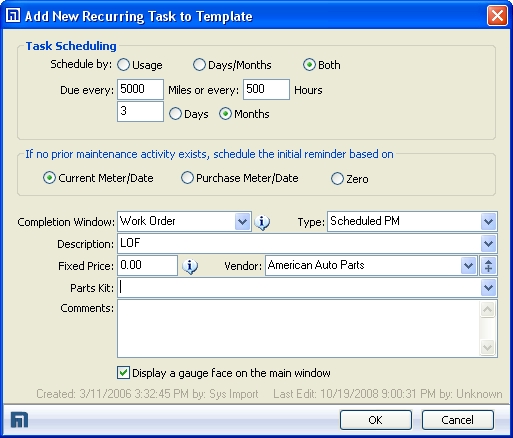
In the example recurring task above, this recurring task will create
reminders that will be triggered by odometer, by clock hours, and by
calendar time, whichever comes first.
|