|

Title: HOW TO: Setup and Use a Google(r) Gmail
Account with FLEETMATE
Overview:
You can use the email features in FLEETMATE with a Gmail account. However,
you will need to define your mail settings in FLEETMATE in a specific way.
Settings:
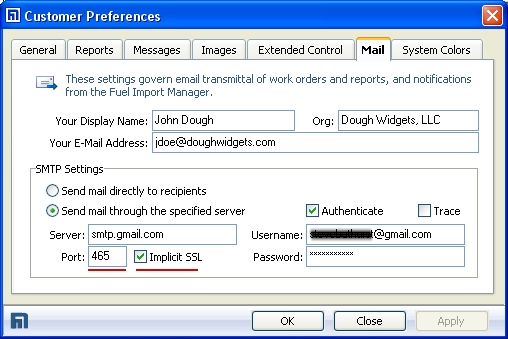
The picture below illustrates sample settings for using a Gmail account to
transmit work orders, Invoices, and various reports from FLEETMATE.
-
SMTP Server: smtp.gmail.com
-
Port: 465
-
Implicit SSL: Checked
Notes:
The settings above were valid as of October 2012. It is
recommended that you verify that these settings remain valid by referring
to online gmail technical documentation available on the Web.
All of the above settings follow each user's Windows account, and are
independent of the FLEETMATE database that is in use.
|